Why are AI images so hard to tweak?
6 ways to get more stable, repeatable edits from AI image tools
6 Ways To Get More Stable Edits in AI Image Tools -Thursday 4th December
If you spend any time with generative AI image tools, you’ll know the feeling. You finally get an image you like. You just want to move a prop, tidy the background, soften the lighting a bit.
You type a tiny prompt change. Two minutes later you are staring at a completely different picture and wondering what on earth just happened. Another prompt tweak, another jump. Half an hour later the original look has vanished, you have 27 variations of “nearly but not quite”, and any notion of “AI efficiency” has left the building.
You are not doing anything wrong. Current image models really are unstable when you try to make precise changes. And while there isn’t yet any magic “make this behave like Photoshop” button, there are things you can do to make the process more stable…and keep your blood pressure down!
First, we need to understand how AI image generators work.
How most image models actually work
Most of the popular tools today (such as Midjourney, Stable Diffusion, Nano Banana, Flux, ChatGPT/DALL·E, Seedream, Nano Banana / Gemini Image, Qwen, Hailou, Ideogram etc) are diffusion models.
In simple terms that means:
- The model starts from a frame of pure visual noise, like TV static. This noise is generated by a starting number called the ‘seed’.
- It gradually “denoises” that static over dozens of steps.
- At each step it slightly adjusts the pixels to be more like things it has seen in training images that match your prompt.
So the process is “from noise to picture” rather than “open an image and edit some pixels”.
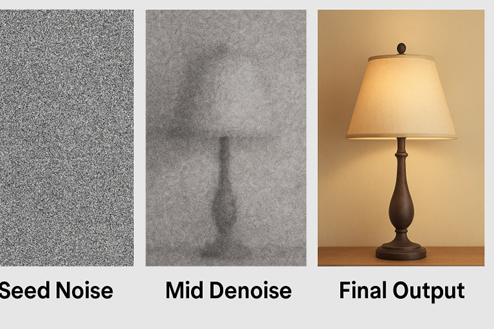
Why is this important? Well, the big consequences of this are:
- Every image prompt is a fresh roll of the dice. If the model starts from different random noise, it will wander towards a different final image, even with the same prompt.
- The model does not truly “know” what is in your scene. It is not thinking “here is a chair, here is a lamp”. It is matching patterns between the words in your prompt and millions of training images it was trained on.
Why “Make a small tweak” often means “Start again”
When you input an edit prompt like “same image, but move the lamp slightly to the left”, the model is not literally moving the lamp. It is regenerating an entire new image that roughly fits “room with lamp” again.
Sometimes you can be lucky, and the randomness is close to what you wanted. Other times, not so much. That is why what feels like a small creative note often becomes a completely new composition.
Even when an AI tool shows you an “edit” button, under the bonnet though, most of them still kick off a new diffusion run:
- Your updated prompt goes in.
- The model starts from a fresh random seed (i.e. a new frame of static noise) by default.
- The whole scene is re-generated, albeit with some extra weight given to your new instruction, such as “move the lamp left”.
On top of that, and crucial to AI generative models, is that the underlying AI systems are deliberately not fully deterministic. What that basically means is that the models are deliberately set up to have randomness and probabilities – without that, if you think about it, every prompt would return the exact same answer for all of us. Which would not be very useful. So that’s why stable image generation with AI is so tricky. We are relying on the randomness to create new and exciting images for us, but at the same time, we also want to control that randomness to suit our own needs – it’s like organised chaos!
Image editing is a big area of research in generative AI right now, but researchers flag that it is a real challenge. Even when they carefully control randomness, they still see small but visible differences between runs.
All of which is a long way of saying: the random changes you keep getting in your images is baked into how these systems work today. It is not just you! So is there anything you can do to make it less chaotic…thankfully yes.
6 Ways to make image editing more stable.
While we might be some way off from a totally fool proof system of AI image editing (and let’s be honest, a very effective stable way of editing images doe already exist – they’re called skilled humans), there are things you can do to make AI image editing much more stable.
1.Seed locking – helpful (but not a silver bullet)
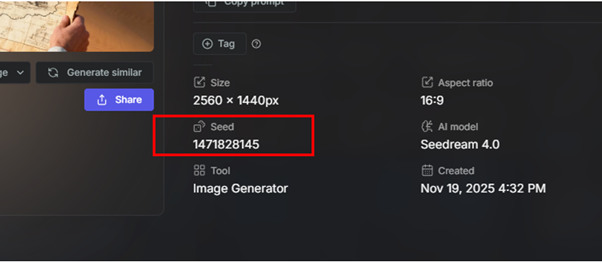
As I said earlier, most diffusion systems use a seed – a number that controls the starting noise. Every starting frame of noise is unique, like a fingerprint, and has its own randomly generated number. In theory, if you reuse the same seed number with the same prompt and the same model version, you should usually get the same, or very similar, image. I’ve had middling success doing this.
- Midjourney lets you set a seed explicitly, rather than letting it pick a random one each time.
- Stable Diffusion tools expose seeds by default and even talk about “variational seeds” for controlled small changes.
Below is an image from Seedream, using Getimg.
It sounds pretty smart! So why is this not the perfect solution?
- It only helps if you can see and re-use the seed. Many web interfaces hide it. OpenAI’s newer ChatGPT image tools, for example, offer in-editor updates but do not expose seeds to the user anymore. The same goes for Nano Banana, they do not show the seed number, but their new version claims to have better ‘context locking’, to keep an image more stable as you prompt changes.
- The whole system has to stay identical. Change the model version, the sampler, or even the GPU, and that careful control of randomness can fall apart – i.e. it only takes a tiny change in the system and you get the randomness again!
- A bad prompt can undo everything. If you reuse the seed but significantly change the prompt, the model is again walking to a new solution from the same starting noise, so large edits will still look like a different shot, not a small tweak.
So when is seed locking helpful? It gives you a way to return to a look you liked, and sometimes to get calmer variations, but it does not turn a diffusion model into a frame-accurate Photoshop type editor.
2. Inpainting and “vary region” – changing just one bit
The next big tool in the box is inpainting – editing only a specific patch of the image.
- Midjourney’s “Vary Region” lets you draw a box around part of the image and change just that area, keeping the rest intact.
- Stable Diffusion and platforms like Getimg offer mask based inpainting, where you paint over an area to be regenerated. I’ve had some good results with these. But not always perfect.
- ChatGPT’s built in image editor now does something very similar: select an area, describe the edit, and it regenerates that region while trying to respect the surroundings.
Inpainting works because the model is given more context: it sees the existing image, plus a mask, plus your text. It still runs a denoising process, but the “known” pixels constrain the result.
Used well, this is probably the most reliable way to do surgical edits, but there are still some things to watch out for:
- Keep each change small and specific. “Replace this cup with a blue mug” is fine. “Change the lighting, remove the person and swap the background for a cityscape” in one go is asking for chaos. Generative AI models work best doing one thing at a time, step by step. Multitasking confuses them and raises the probability of your image having massive unwanted changes.
- Complex regions, like busy crowds or fine text, still throw models easily because they never truly understood the scene in the first place. (Text in general is a minefield for generative AI!)
Inpainting is good, but not perfect. Think of inpainting as a slightly unpredictable clone stamp, not as a pixel perfect brush.
3. Referencing previous images
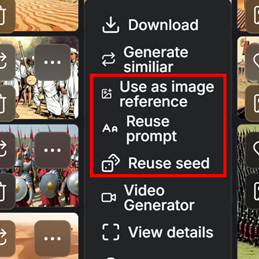
Because models forget everything between runs, referencing earlier images is crucial. And I have had the most success doing this.
Most platforms now give you options such as:
- Image prompts in Midjourney, where you can feed a previous frame in and control how strongly it influences the next result.
- Image to image workflows in Stable Diffusion, Getimg and Adobe Firefly, where you provide a base image and then push it towards a new prompt.
In practice, this is like keeping old cuts of an edit. Save “version 03 that you actually like” and feed that back into the tool as your reference when subsequent changes go off on a tangent.
4. Staying in one model
Just as important is sticking to one model and version for a given project. Moving from, say, SeeDream to Flux, or from Midjourney v6 to v7, will immediately change style, composition and even aspect ratio behaviour. User guides all warn that different versions of the same model can behave very differently with the same prompt.
If you want stability, treat the model version like a camera body. Do not swap it mid shoot unless you really need to.
5. Chose the right tool for the job - some models are more stable than others
Marketing from Google around Gemini Image and Nano Banana talks a lot about “context aware editing” and “advanced creative workflows”, which basically means they claim to keep a conversation’s context so you can refine small detail in the image.
In reality, user reports are mixed. And I agree with them! Some UK users cannot even access photo editing due to regional restrictions, and others report silent failures when trying to modify uploads. I’ve experienced this myself, where Nano Banana just stops or ignores prompts. And it is still terrible at being able to produce images with an aspect ratio of 16:9, which is baffling considering how standard 16:9 is!
Similarly, OpenAI’s own image editor in ChatGPT is very good at following detailed instructions over multiple turns, but it still does not expose seeds, and edits to small areas can bleed into surrounding regions. It also feels like OpenAI’s push for stability has left their images quite creatively restrictive, ChatGPT’s image usually have that ‘ChatGPT look’.
By contrast:
- Midjourney is widely praised for sheer visual creativity, their images awesome, and you can see why creatives love it. But users consistently find it one of the least predictable tools when trying to keep a design fixed while making tiny tweaks.
- Stable Diffusion based tools can be made relatively stable if you control seeds, samplers and hardware, but that is closer to running your own in-house postproduction set up, it’s much more involved than casual use and requires big investment.
6. Platforms can offer more stability
Platforms like Adobe Firefly, Canva, Freepik and Getimg build user friendlier editors, like mask tools and templates on top of the AI models, which gives non-technical users more guard rails. So you still get to access Nano Banana, Flux, Seedream, Firefly etc (not Midjourney though), but you get extra settings too. Yes, there is a cost (usually a subscription that is translated into tokens or credits that you spent per run), but the learning curve is often a lot less steep, and it’s easier to build stable workflows using the platforms’ UI infrastructure, rather than having to manage a lot of assets by yourself. But they are still generative AI tools and are not immune to the same issues though. The truth is, so far, there is no completely reliable way yet to AI edit images with 100% reproducibility.
This is something I highlight in my “Demystifying AI for Business” training – generative AI tools are powerful but are fundamentally less predictable than automation AI tools, so they need stronger guardrails and human checking.
For now, the honest answer is no model is truly “stable” in a production sense. Some are easier to wrangle than others, but all of them will occasionally go rogue.
A practical workflow for productions
Given those limits, what can you realistically do today to create a more stable workflow:
- Decide your “hero stack” per project.
Pick one model, one platform and, if you can, one version for each job. Treat changes to that setup as if you were changing camera system. - Always capture seeds and settings when you can.
If your tool exposes seeds, note them down along with key parameters. Think of it as logging lens and exposure. Using a platform makes this easier. - Always keep a log of your prompts.
Prompts should not be random ‘in the moment’ thoughts to vibe your way to a desired outcome! Good prompts, from correct prompt engineering, are like gold. Keep a record of what works. And what you use for each image. This is key when you hit on a style you like and is working for your project. Using platforms are good for keeping track of these. - Use image referencing for big shifts.
When you want larger changes, combine:- the same model
- the latest image you like as an input
- careful prompt changes plus, if available, the seed used for that latest image, not the one from five versions ago.
- Use inpainting or region tools for small fixes.
For minor changes, mask just the area you need, keep your prompt simple, and change one thing at a time. - Version like an editor.
Save key milestones versions as separate files. When an edit spiral starts, step back to the last version you were happy with instead of fighting the current branch!
Used this way, generative image tools can be brilliant for development work, mood boards, pitch decks, quick visual ideas, but they still need a lot of handholding to sit inside a rigid production pipeline. But it is possible.
The slightly unsatisfying truth is that the instability you feel creating images is real and grounded in how these systems are built. The good news is that research on more controllable image editing is moving fast, and right now combination workflows (seeds, inpainting, prompt engineering referencing and good version discipline) can already make things noticeably less random!
Why the UK TV Industry Has an AI Literacy Problem & Why It Matters
Thursday 20th Nov 2025
Spend five minutes talking to anyone working in telly at the moment and you’ll hear the same thing: people are using AI, but almost no one feels properly trained or totally confident. It’s become one of those whispered truths in production offices and WhatsApp groups. Everyone is dabbling, but few are sure what “good” looks like.
And now we have the evidence to back that up, with a slew of reports about the UK telly industry coming out recently.
A major BFI / CoSTAR report published in 2025 spells it out bluntly. The study describes a “critical shortfall” in AI training provision across the UK screen sector and says that AI education is currently “more informal than formal”, particularly for freelancers who lack access to structured upskilling. TV is one of the most freelance-heavy industries in the country. If the people who actually make the programmes don’t have access to proper AI training, the gap between early adopters and everyone else is only going to widen.
The UK government’s own research tells a similar story. In its 2025 review of AI skills across the creative industries, the government warns that many freelancers and production companies are already using generative AI tools without any formal training, and that many lack the ability to critically evaluate AI outputs for accuracy, originality or audience relevance.
That’s not a small issue in TV when we’re dealing with rights-sensitive material, compliance and editorial integrity. If people are using AI but can’t reliably judge what it produces, it introduces all sorts of risks.
A new report Skills England adds another angle. In its 2025 Creative Industries sector assessment, it reports that UK screen employers already suffer from low investment in training, and that key shortages exist in digital skills and AI. It also highlights that standard training pathways rarely reach freelancers, who make up a huge share of the TV workforce. In other words, we’re under-trained as a sector in general, and even more under-prepared when it comes to AI.
So where does that leave the UK telly industry?
It leaves us in a place where AI is already here, already being used, already shaping workflows, (albeit informally) but without the literacy or training to always use it safely and strategically. The big risk right now might not be that AI will replace people but rather that people fall behind because they haven’t been given the tools or support to keep up.
But it is of course fixable. Other sectors are already investing and upskilling. The evidence shows that AI-confident companies grow faster and attract more investment. We just need to start taking AI literacy more seriously in telly. Not as a buzzword, but as a core professional skill for the decade ahead.
References:
https://a.storyblok.com/f/313404/x/ac4c0235f7/ai-in-the-screen-sector.pdf